|
|
|
|
 |
 |
|
CONVERTING TEXT TO OUTLINES IN ILLUSTRATOR
Select text layer Go to Type --> Create Outlines Your text should now be converted to outlines.
TIPS FOR PHOTOSHOP USERS
- If you are using Photoshop version 6 or higher, you do not have to convert your .psd file to .eps. Simply convert any text to custom shapes (see below), zip/stuff the file, and upload it to us. Any pixel/bitmapped portions of your .psd file must still be at LEAST 300 dpi at the size to be printed.
- If the bitmapped portions of your file are lower than 300 dpi, manually changing the resolution in Photoshop (upsampling) will degrade the quality of your image and will result in an unsuitable image file.
- When including text, text shapes, or other custom shapes in your photoshop document, please do not rasterize or flatten the shape/text layers.
Converting text to custom shapes
- In the Layers palette, click on the text layer to be converted.
- In the Layer menu, select Layer --> Type --> Convert to Shape
Vector vs. Bitmapped Files
All computer graphic programs fall into two basic categories: paint (also known as bitmapped or raster) programs and drawing programs. A paint program works with pixels, and a drawing program works with vectors. (Mathematical calculations)
In a bitmapped graphic, a shape is drawn as a grid of pixels (dots) and each of those pixels is assigned a specific color value. Programs such as Photoshop, PaintShop, and PhotoPaint all work with pixels.
Vector graphics, on the other hand, do not use pixels and are based on mathematical formulas that represent curves and lines. Vector graphics are very smooth looking and can easily be resized without loss of image quality. Programs such as Illustrator, Freehand, and CorelDraw are all vector based.
What is file resolution?
File formats such as tif, jpg and psd are pixel based, as opposed to .ai or .eps files, which are vector based. When we discuss the resolution of a file, we are referring to the number of pixels in a bitmapped (raster) image file.
All bitmapped images are made up of pixels laid out in a grid. Resolution is then defined as the number of pixels displayed per unit of printed length, usually referred to as dots per inch (dpi). When an image is 300 dpi that means there are 300 pixels for every inch of image.
A low resolution image is one that does not have many pixels, or not enough for the intended use. We require all files submitted to us be at least 300 dpi.
Many people make the mistake of increasing the resolution of a file after it has been scanned/created. Since the lower resolution pixel information is simply spread across a larger area, doing this will degrade the quality of the image.
Photoshop will allow you to duplicate pixels, (called "upsampling") which has the effect of increasing the resolution. This should not be attempted when sending files to us, as the image will be too fuzzy and degraded to be useful.
|
|
 |
 |
 |
 |
 |
|
 |
 |
 |
 |
|
 |
|
|
- All files must be uploaded though this website. We do not accept files via email. If you need to re-upload an altered or fixed file, it must also be submitted through this website.
- Accepted file formats: .psd, .pdf, .tif, .eps, .ai
- We do not accept the following file formats: MS Word, Powerpoint, Publisher, or MS Office clipart. If you only have an MS word file, please use convert your Word document to a PDF file.
- Art should be VECTOR EPS (Illustrator .EPS, OR .AI) with all text saved as outlines or curves, or at 300-1200 (higher is better) dpi B/W .TIF or .PSD file at the size it will be printed. Please avoid the use of tones, gradients, and shading - most of our printing processes will not reproduce tone art correctly.
Converting text to outlines in Illustrator Photoshop Tips Vector VS Bitmapped Files What is file resolution?
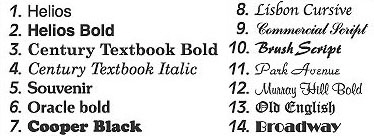
- If we are adding typesetting to your supplied logo, or if your job will only require typesetting, you may select from our “house fonts”
|
|
|
|
 |
|
|
 |
|
|
|
 |
|
|
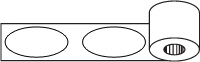
View & Download PDF Die Templates for our ink printed labels!
|
|
|
|
All copy must be placed no less than 1/16” inside the die cut - this includes inset borders.
- All bleed copy must extend (bleed) 1/16” outside the die cut. Bleed borders must be a min. of 1/16” thick with an additional 1 1/6” bleed outside the die cut.
- Minimum size rule lines are 1 pt.
- Positive text may be set no smaller than 5 pt for sans-serif fonts, and no smaller than 6 pt for serif or script fonts.
- Reversed (knocked out) text may be set no smaller than 8 pt for most fonts.
- Art that is reversed or knocked out should not contain very fine detail, as it may “fill in” on press.
- Registration of color to color is 1/32” between any two colors and the min. width for traps is 1 pt.
- Due to the nature of flexographic inks, any two colors that trap (overlap) will produce a third color.
- If you are submitting a bitmapped file, it must be AT LEAST 300 dpi. The recommended resolution is 600-1200 dpi.
IMPORTANT: while the printer will run files sent in at 300 dpi, the final output may be slightly jagged around the edges. This will not always show up in the proofs that we send you, but is an unavoidable result of running low resolution files on press. For optimal output, please upload files set at at least 600 dpi or full vector files.
- If you are submitting a bitmapped file, it must be black and white. We CAN reproduce grayscale (screened) art for this product line. Screen valuse may range from 3% - 90%. Gradated screens can range from 3% - 100%.
- Vector files submitted for this product line line may be in color.
- If you are submitting art for a 2 color label, it MUST be in vector EPS format.
|
|
|